Having spent most of my time on NodeJs I recently attended a .NET course in Melbourne.  I'm a fan of .NET and MVC 5 has come a long way.  I doubt many will argue that the tooling in the MS land is by far the best there is.  I really like Visual Studio ( as long as you have a decent machine to run it ), I really like nuGet ( MS .NET package manager ) I really started to feel like home.

I also really like MVC5, it feels familiar.  The base templates are great to get started and scaffold x% of the work for you.

I think the biggest eye opener of the day was Azure.  I quite enjoy the Azure model.  .NET lends it self well to then and the integration between the tooling and the deployment platform is tight.  I had next to no issues deploying simple apps and the 10 free websites is great for testing and getting side projects up and running.

That being said I think the biggest item I took from the event was Glimpse.  It was just fantastic, I wont start a project without it anymore.  Its basically request level debugging in the browser for .NET if you haven't tried it I suggest you do. http://getglimpse.com/

Like it or loath it I'll Microsoft have come a long way and I can see start ups looking to MS technology moving forward as they are really closing that gap enabling dev to get going for next to no cost ( or zero cost ) and provide a pathway to support your application as it grows.


Setting up a new VPS for a small app I'm working on and was stumped by this problem.  This didn't happen locally and after discovering the solution I knew why.  The reason why is I did not have nodeJs install on the VPS.  As I have been working on a nodeJs app in the past few months I already have node installed locally.

I'm running ubuntu and here are the commands to install nodeJs:


sudo apt-get install python-software-properties python g++ make
sudo add-apt-repository ppa:chris-lea/node.js
sudo apt-get update
sudo apt-get install nodejs 
This will install the current stable version of nodeJs.  After that I was in business.

Google apps sync for Office / Outlook 2013 was released.

I've been on Office 2013 for around 6 months.  We use Google Apps for mail and it's been frustrating having my mail and calenders not sync with Outlook properly.

I know I can use IMAP ( infact thats what I was using ) and a few other bolts on ( which I purchased ) to restore functionality but it just wasn't 100%.

In the mean time I had reverted to using the browser 99% of the time for email and calendar which I have grown fond of.

Now that Google Apps sync works properly I'll give Outlook 2013 a good try.

https://tools.google.com/dlpage/gappssync


Failed to copy from Local TSource : Expected another server reply(15) : 450 Internal error renaming the file.  Filezilla

This error kept coming up trying to FTP files to one of my servers.  I googled around a bit as nothing had changed in the environment that should have causes this issue.  After finding nothing thats looked like the issue I decided to try the old reboot trick.  Well it worked.  No idea why this happened but after a reboot the problem went away.

I actually came back to this issue and it was because the hard drive filled up completely.  Well that was an easy fix.
It can be a little confusing setting up a blogger blog with your own domain.  The www is quite straight forward however a naked domain can also be re-directed to a blogger blog and there are a few extra steps.

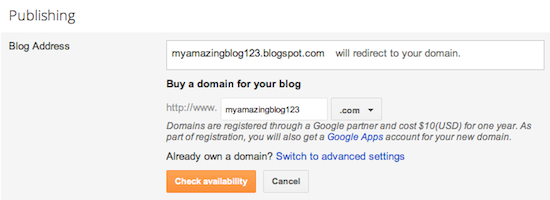
In settings Choose advanced settings and setup your blog and domains as so:

Then follow these steps.
  1. Find the control panel on your domain registrar’s website, and locate your DNS (Domain Name System) settings. In order to link your blog to your custom domain, follow the instructions below to enter your "CNAME" and "A-records."
    CNAME
    Add two CNAME records. For the first CNAME, where it says Name, Label or Host enter "www" and where it says Destination, Target or Points To enter "ghs.google.com" . For the second CNAME, enter "A7LABD5AAAOU" as the Name and
    "gv-AAAAAAAA.dv.googlehosted.com." as the Destination. See our detailed instructions on providing CNAMEs for various registrars. If yours isn't listed, or if you run into other difficulties, contact your registrar directly and they can help you out.  ( ensure you use the mentioned CNAME records in the instructions )
    A-records (optional)
    The following action links your naked domain (example.com) to your actual site (www.example.com). If you skip this step, visitors who leave off the "www" will see an error page.
    Enter your domain name in the format example.com, and list the I.P. addresses shown below in the "A" section. You'll need to create four separate A-records which point to four different Google IPs.
    216.239.32.21
    216.239.34.21
    216.239.36.21
    216.239.38.21
  2. Update your Blogger settings
    Before you move onto this step, wait about an hour for your DNS settings to activate. If you attempt to change the publishing settings before the DNS changes activate, then we'll let you know with a warning message.
    Now it’s time to make sure Blogger knows about your custom domain so that Google can direct readers to your blog. Just head back to Blogger and update the information on your Settings | Basic tab. Find the area for "Publishing," and click the link to add a custom domain.
    Add a custom domain
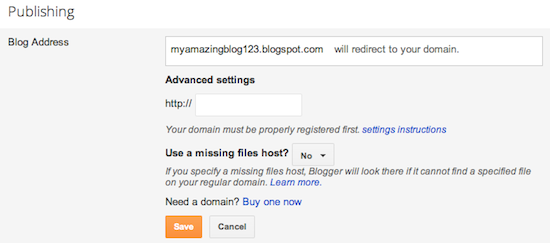
    Then, click on "Switch to advanced settings."
    Advanced Settings
    Enter in the URL for your custom domain in the text box provided, and click Save. That’s it! Your blogspot.com address will soon redirect to your new custom domain -- be patient, as it might take up to 24 hours for the redirect to start working.
    Enter URL and save
    Congratulations, you’re all set!
Some helpful notes:
  • If your new domain isn't taking you to your blog, wait another day or two to make sure all the DNS servers have been updated. If it still isn't working, contact your registrar to make sure you entered the DNS settings correctly.
  • Your original Blogspot address will automatically forward to your new domain. That way, any existing links or bookmarks to your site will still work.
  • Your posted images will continue to display on your blog.

Wile attempting to answer a question on Stack Overflow I ran into an interesting difference between Railo and ACF

I've begun to use Railo more and more and this simple piece of code I expected would "just work". Well on Railo it did. On ACF it did not.

ACF sees the js array passed as a variable names "array[]" ( literally ) with a comma separated string as the arguments. Railo sees this as an array server side and treats it as such. See the results. ( not I have a cfdump is the ajax call using fire bug I can see the result of the dump of the arguments scope )

Railo:


AFC:


CFC:


CFM:


I forgot a password to a mySQL datasource on my personal VPS. Not the end of the world I can log in to mySQL and reset it if I need but I knew these passwords were in new-datasource.xml in an encrypted format and was curious to see if I could decrypt that password. Turns out you can. I used this post as a staring point http://paulalkema.com/post.cfm/pull-a-list-of-all-coldfusion-datasources-along-with-username-and-passwords and while I was at it built this small app in case I need it in the future.
The new Railo installers are fantastic Jordan has done a great job.

I have a small VPS running demos for this blog it's running Railo. It's mostly for demos but also has a few small hobby sites.

I really don't need to allocate 512 to Railo I wanted to drop it to 256mb ram ( the VPS in Windows server 2008 r2 with only 512 ram which also runs .NET 4 and SQL Server Express ).

I search for a config file but there was none.

So here is how to change your jvm args and lower or raise the amount of ram you allocate to tomcat for Railo.

Click Start, Navagate to "Railo", click "Railo-Tomcat Servcice Control"

This will allow you to edit the options on the service.

Select the java tab

Then add jvm args and adjust the memory.

Screen shots:


I find it handy to dump out a scope and email it to myself. I use this occasionally in Application.cfc in onError() or onMissingTemplate() to dump cgi and the exception variables.

This weekend I was working on a small ColdFusion project and am using cf9. All my cfc's are in script and I wanted to dump full scopes and email them back to myself. Its not as simple as in tags but its a workable solution using savecontent.

I really expected this to just work:

mail.addPart( type="html", charset="utf-8", body=writedump(application) );

But it wont so here is the solution:

Here is the solution:


The other exception to my project was one cfc had to have a udf for cfexecute which also is not yet in cfscript.


Update.

To answer Steves question here is the code example.

You can just attach the report as a file attachment and specify the content.

If you need to increase the connection pool in a .NET application this is what you need to add to your webconfig file:

;max pool size=200

This would increase the connection pool to 200 ( from a default of 100 I believe )

This will be in the appsettings node as follows:

I have been working with jQGrid and upon adding a new record wasnted to jump to the last page of the grid upon successful save of a new entry without clicking the "last page" button. It really wasn't that had and Dave pointed me in the right direction with setParam.

Here is the code:


Working with jqGrid has been great but I'm also really looking forwards to the official jQuery grid.
I recently had to move data from one server to another.  The serevr runs linux, Railo and mysql.  It's always a pain migrating databases bewteen servers but mysql makes this so easy:


This will prompt you for the root password but if you want to can add the password after the -p and not be prompted.

Thats it.  you can now run this and restore all your databases on the new server or pick through it and restore the ones you need.

What would you prefer and why?

EXTjs is not free

jQuery is.

EXTjs is built into ColdFusion jQuery is not.

jQuery is Microsoft's defacto Ajax library so it has some big support behind it.

We use EXTjs at work but I use jQuery at home.
We had a largeish DB server corrupt a disk and in the process cause one of the databases to become suspect.

This can be resolved by running the following:

EXEC sp_resetstatus 'DBName'
GO
ALTER DATABASE DBName SET EMERGENCY
DBCC checkdb('DBname')
ALTER DATABASE DBName SET SINGLE_USER WITH ROLLBACK IMMEDIATE
DBCC CheckDB ('DBName', REPAIR_ALLOW_DATA_LOSS)
ALTER DATABASE DBName SET MULTI_USER

GO

From: http://blogs.microsoft.co.il/blogs/dbaces/archive/2008/12/28/how-to-repair-sql-server-2005-suspect-database.aspx

However we had a database with a hyphen in the name eg: data-base-name

To get around this use " " around the data-base-name eg:


EXEC sp_resetstatus 'data-base-name'
GO
ALTER DATABASE "data-base-name" SET EMERGENCY
DBCC checkdb('data-base-name')
ALTER DATABASE "data-base-name" SET SINGLE_USER WITH ROLLBACK IMMEDIATE
DBCC CheckDB ('data-base-name', REPAIR_ALLOW_DATA_LOSS)
ALTER DATABASE "data-base-name" SET MULTI_USER

GO
I setup a new server that will have access to the outside world.  This of course means I need SSL.  We have a wild card SSL cirtificate for the domain and I know they can be a pain to install in IIS6 but I wasn't sure how it would be in IIS7 ( Windows 2k8 ).

Anyway I was following the steps provided when I bumped into this:


It's actually a known issue and is described here and what to do about it:


http://www.digicert.com/ssl-certificate-installation-microsoft-iis-7.htm

Note: There is a known issue in IIS 7 giving the following error: "Cannot find the certificate request associated with this certificate file. A certificate request must be completed on the computer where it was created." You may also receive a message stating "ASN1 bad tag value met". If this is the same server that you generated the CSR on then, in most cases, the certificate is actually installed. Simply cancel the dialog and press "F5" to refresh the list of server certificates. If the new certificate is now in the list, you can continue with the next step. If it is not in the list, you will need to reissue your certificate using a new CSR (see our CSR creation instructions for IIS 7). After creating a new CSR, login to your DigiCert account and click the reissue button for your certificate. 

It was actually easier in my case as I already had the pfx exported from the IIS 6 server but still an error like this coming up on a brand new server is not confidence building.


All in all I think MS did a decent job with IIS7 and SSL and its less confusing then IIS6 and I now have my CF9 Flex app running behind SSL.
We use MP4's to deliver some content.  Some is on our own server ( in Dev ) and the rest on Akamia.  I just set up a new ColdFusion 9 box and forgot about the mime tpye for MP4.  For such a simple thing I seam to forget the mime type every time for mp4.

So here it is:

mp4 video/mp4

I just got a new laptop and have been setting up my local dev environment. After installing IIS and ColdFusion ( 8 and 9 ) I wanted to bump the JDK past the class loader issues with pre 1.6.0_10. I figured I'd go with the most recent ( 1.6.0_18 )

This is a simple process and I'll outline it here. This is the same on Win XP, 2003, Vista, Windows 2008 and Windows 7.

Download the JDK: http://java.sun.com/javase/downloads/index.jsp

Choose the appropriate edition ( I'm running 64bit Windows and CF8 ) so 64 bit edition for me. Make sure you get the JDK not the JRE.

Install the JDK and take note of the install directory. I left it all as default and the install folder is: C:\Program Files\Java\jdk1.6.0_18

Browse to you CFADMIN and select Java and Java Settings:


Replace the Java Virtual Machine path with C:\Program Files\Java\jdk1.6.0_18\jre

Save this and restart your CouldFusion services.

Log back into the CFADMIN click Settings and Summary and confirm the java version is now 1.6.0_18.

 
And that's it.
I was setting up a new server and compiling some apache conectors when I came across this error:

me@server.com: make
cd . && aclocal
/bin/sh: aclocal: command not found
make: *** [aclocal.m4] Error 127

Where does this come from and how do you fix it?

It's part of Automake . To fix it on Debian/Ubuntu:

apt-get install automake

and CentOs

yum install automake

Or you can download and set it up here.
My cousin wanted to have his own Ventrilo server so I set it up for him on a old PC running Ubuntu 9.04. He didn't want to have to start or stop the server just wanted to be able to leave the machine on all the time and if it did happen to be turned off wanted it to start automatically.

Here is the process:

Create a new user on your system to run the process as. I called the user ventrilo.

Create a new script in init.d

vi /etc/init.d/vent

Add the following:

#!/bin/sh
# ventrilo server

case "$1" in
'start')
# Startup ventrilo servers.

VENPATH=/home/ventsrv
VENBIN=$VENPATH/ventrilo_srv

su ventrilo -c "$VENBIN -f$VENPATH/ventrilo_srv -d"

renice -5 `cat $VENPATH/ventrilo_srv.pid` ;;
'stop')
killall ventrilo_srv
;;
*)
echo "Usage: $0 { start | stop }"
;;
esac
exit 0


Make sure you set the path correctly ie:

VENPATH=/home/ventsrv

Make the new script executable.

chmod +x /etc/init.d/vent


Run:

update-rc.d vent defaults

And reboot the server to confirm ventrilo starts on boot.


You can now stop and start your ventrilo server like so:


Start:

/etc/init.d/vent start


Stop:

/etc/init.d/vent stop


This is basically for my own future reference note the IP address is important and needs to be used for the @ A record.

To Forward or Mask Your Domain

  1. Log in to your Account Manager.
  2. In the My Products section, click Domain Manager.
  3. Select the domains to modify.
  4. Click Forward, and then select Forward Domain.
  5. Select http:// or https:// depending on your server settings. For more information, see HTTP vs. HTTPS.
  6. In the Forward to field, enter the URL to which you want your domain to forward.
  7. To automatically update your nameservers to accommodate your forwarding changes, select Update my DNS setting to support this change.
  8. To view additional options, including masking, click the Advanced Options hyperlink.
  9. Select one of the following:

    Forward Only
    Specifies the length of time for this forwarding setting. Select one of the following Redirect types:
    • I am permanently forwarding my domain — Redirects to the site you specified in the Forward To field using a "301 Moved Permanently" HTTP response. The HTTP 301 response code tells user-agents (including search engines) that the location has permanently moved.
    • I am only temporarily forwarding my domain — Redirects to the site you specified in the Forward To field using a "302 Found" HTTP response. The HTTP 302 response code tells user-agents (including search engines) that the location has temporarily moved.
    Forward with Masking
    Prevents the forwarded domain URL from displaying in the browser's address bar, and lets you specify Meta Tags for search engine crawlers by completing the following fields:
    • Title — Displays at the top of the browser window and in search results.
    • Description — A short description of your website to display in search engine results.
    • Keyword — A list of comma-separated keywords that describes the content and purpose of your website.


  10. Click OK.


 NOTE: Forwarded domains can take up to 24-48 hours to become active.

http://help.godaddy.com/article/422?prog_id=GoDaddy